
Lately I’ve been installing SharePoint 2010 Server for a customer. It was a little tricky, as the server didn’t have Internet access, so I had to do all of downloads manually. (Fortunately I’ve found this PowerShell script, so this manual work wasn’t so bad.)
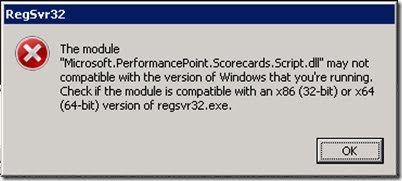
After a smooth installation of prerequisites, I tried to install the SharePoint 2010 Server in Farm mode, but after a few minutes got the following error: Error writing to file: Microsoft.PerformancePoint.Scorecards.Script.dll. Verify that you have access to that directory. Of course, I was administrator on that box with Windows Server R2 x64.

I tried again and again, the result was the same error. I even turned UAC off, but didn’t help. Neither Event log nor log files contained anything useful only the same error message as the screenshot above. Procmon also didn’t give anything useful at all. When I was looking for the Microsoft.PerformancePoint.Scorecards.Script.dll found out that it had been saved to a temp folder on the server during the setup process, so I could try to register it manually but no success again. It was the weirdest error message I’ve seen:
Finally, I didn’t have better idea than download the install files again and upload them to the server. And guess what: it was working, and the installation was successful without any issue.





Leave a Reply